 Twinpage
Languages and tested pairs
Twinpage translates between 20 languages, in any direction your phone supports. One pair, English to Spanish, has been run on a real phone; four directions have been run on a Mac. The rest are not tested yet, and this page says so.
Free: 1 document a day up to 3 pages. iOS 26 or later, phone only.
Twenty languages at a glance
Status shows what we have actually run. Tested on device means a real phone run; tested on Mac means the same engine on a Mac; not tested means we have not checked the result yet. Whether a pair is available depends on your phone and its iOS version.
| Language | Script | Direction | Note | Status |
|---|---|---|---|---|
| English | Latin | Left to right | Usually shorter than its translation | Tested on device as source (to Spanish); on Mac to and from Spanish and Russian |
| Spanish | Latin | Left to right | Often longer than English, type in cells may shrink | Tested on device as target (from English); on Mac to English |
| Russian | Cyrillic | Left to right | Often longer than English | Tested on Mac to and from English |
| German | Latin | Left to right | Long compound words in narrow cells | Not tested |
| French | Latin | Left to right | Often longer than English | Not tested |
| Italian | Latin | Left to right | Not tested | |
| Portuguese | Latin | Left to right | Not tested | |
| Chinese (Simplified) | Han | Left to right | No spaces between words; system font | Not tested |
| Chinese (Traditional) | Han | Left to right | No spaces between words; system font | Not tested |
| Japanese | Kanji and kana | Left to right | No spaces between words; system font | Not tested |
| Korean | Hangul | Left to right | System font | Not tested |
| Arabic | Arabic | Right to left | The app sets right to left layout for Arabic; we have not yet checked the result by eye | Not tested |
| Turkish | Latin | Left to right | Not tested | |
| Ukrainian | Cyrillic | Left to right | Not tested | |
| Polish | Latin | Left to right | Not tested | |
| Dutch | Latin | Left to right | Not tested | |
| Indonesian | Latin | Left to right | Not tested | |
| Thai | Thai | Left to right | No spaces between words, line breaks are harder; system font | Not tested |
| Vietnamese | Latin with tone marks | Left to right | Not tested | |
| Hindi | Devanagari | Left to right | Not checked by eye in As original mode; system font | Not tested |
source: Twinpage language list, Mac test log (October 27, 2026), device run (October 29, 2026)
Tested language pairs
| Pair | Document | Device | Time | Date |
|---|---|---|---|---|
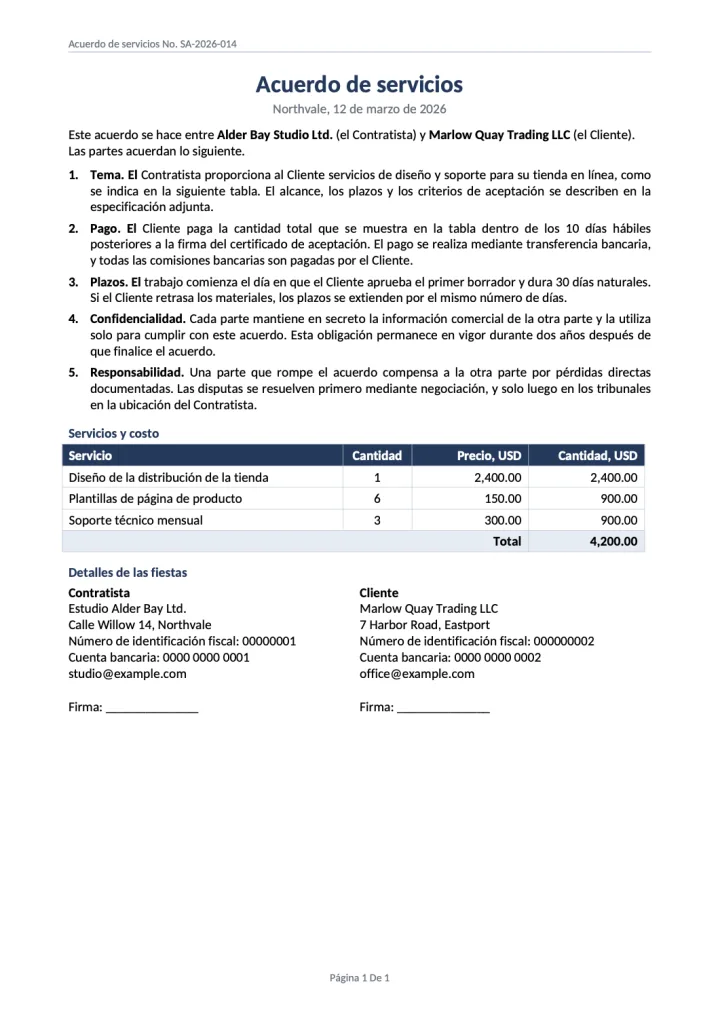
| English to Spanish | Sample Service agreement | Phone, iOS 27.2 | 217 s including language preparation | October 29, 2026 |
| English to Spanish | Contract, .docx | Mac | 7.0 s | October 27, 2026 |
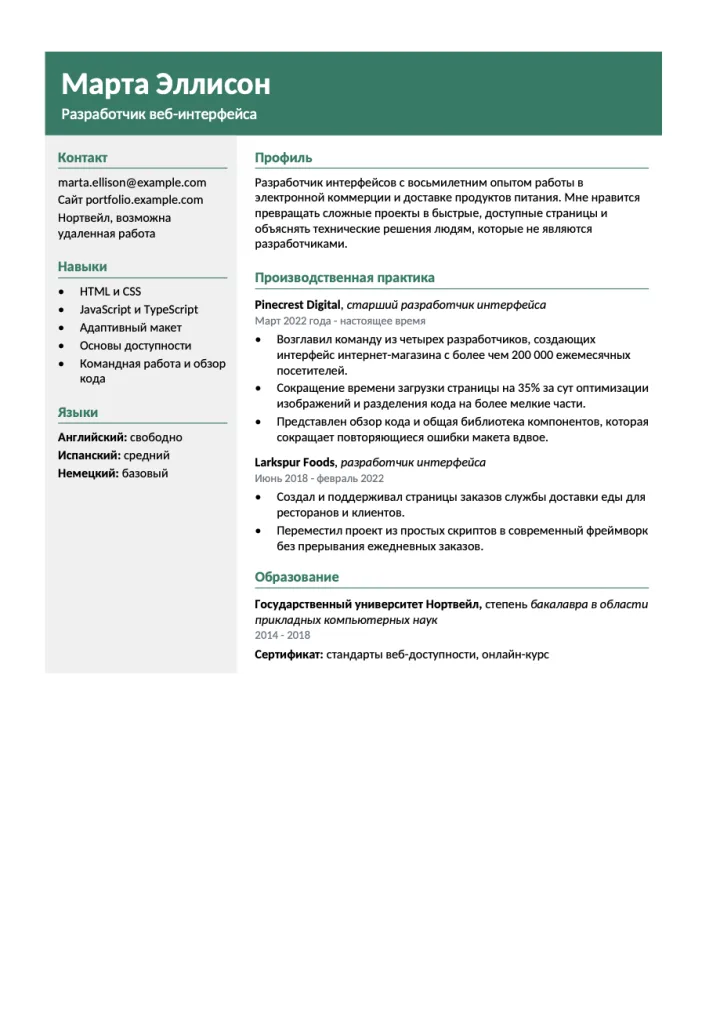
| English to Russian | Résumé, .docx | Mac | 2.1 s | October 27, 2026 |
| Spanish to English | Contract, .docx | Mac | 2.1 s | October 27, 2026 |
| Russian to English | Résumé, .docx | Mac | 1.3 s | October 27, 2026 |
source: the Twinpage Mac test log and the device run of October 29, 2026
Mac times count only the translation, with the language already downloaded. In these runs the table, headers and footers, two columns, lists and colors stayed in place, and Cyrillic and Spanish accented letters came out correctly. The runs also showed typical machine translation slips on short labels, such as Details of the parties becoming Detalles de las fiestas. More on what to check is in translate a PDF and keep the layout.
Free: 1 document a day up to 3 pages. iOS 26 or later, phone only.
Right to left and complex scripts
In As original mode the translation is drawn over the page in the original frames. For Latin, Cyrillic and Greek the app uses open fonts close to common document fonts; other scripts are drawn with a system font. For Arabic the app sets right to left layout, but we have not yet checked a translated Arabic page by eye. The same goes for Hindi, Thai, Chinese, Japanese and Korean: the languages are in the list, and we will mark results here only after a run.
How language downloads work
Languages are downloaded by iOS, not by Twinpage, the first time you need them. The download needs a connection; after it, translation works offline. We have not measured download size or time on a phone yet. Tips for preparing before a trip are in offline document translation.
Questions
Can I translate a PDF to English from any of these languages?
English is a target for every other language in the list, as long as your phone and iOS version support the pair. Only Spanish and Russian to English have been run by us, on a Mac.
Is Hindi supported?
Hindi is in the list of 20 languages. We have not yet checked a translated Hindi page by eye.
Does Arabic come out right to left?
The app sets right to left layout for Arabic. We have not yet checked the result by eye.
Why is a pair missing on my phone?
Pair availability depends on the phone and its iOS version.
Related guides
Same document in a new language
Choose a PDF or .docx file, pick one of 20 languages and get the page back with its tables and columns. Translation runs on your phone.
Free: 1 document a day up to 3 pages. iOS 26 or later, phone only.